Tools
G-Speak
Encrypted voice chat you host yourself
1.5.0
26.3 MB
Overview
20 ms
steady, from the network to the sound card, measured on one PC
E2E
voice, chat and images; the server forwards but cannot listen in
0
accounts: your identity is a key on your own PC
26.3 MB
G-Speak.exe, the whole app
G-Speak is voice chat you host yourself, for LAN parties, clans and friends, in the spirit of TeamSpeak. One PC runs the server: from the app with one click, or as a Windows service with the Boss Room to manage it. Everyone else joins with the app or straight from a browser, on your own network or over the internet. Free, no account, no ads.
| App | G-Speak.exe for Windows: connect, talk, chat, and host a server on this PC. English, Dutch, French, Spanish and Portuguese. |
| Server | gspeak-server as a Windows service that starts with Windows, or on its own from the command line. |
| Boss Room | A window to run the server: players, channels, who may enter where, roles and rights, bans, invites, the AI, reports, a 24-hour replay and a signed Black Box. |
| Browser | Join from Chrome, Edge or Safari, also on a phone, without installing anything: speak.garia.net. |
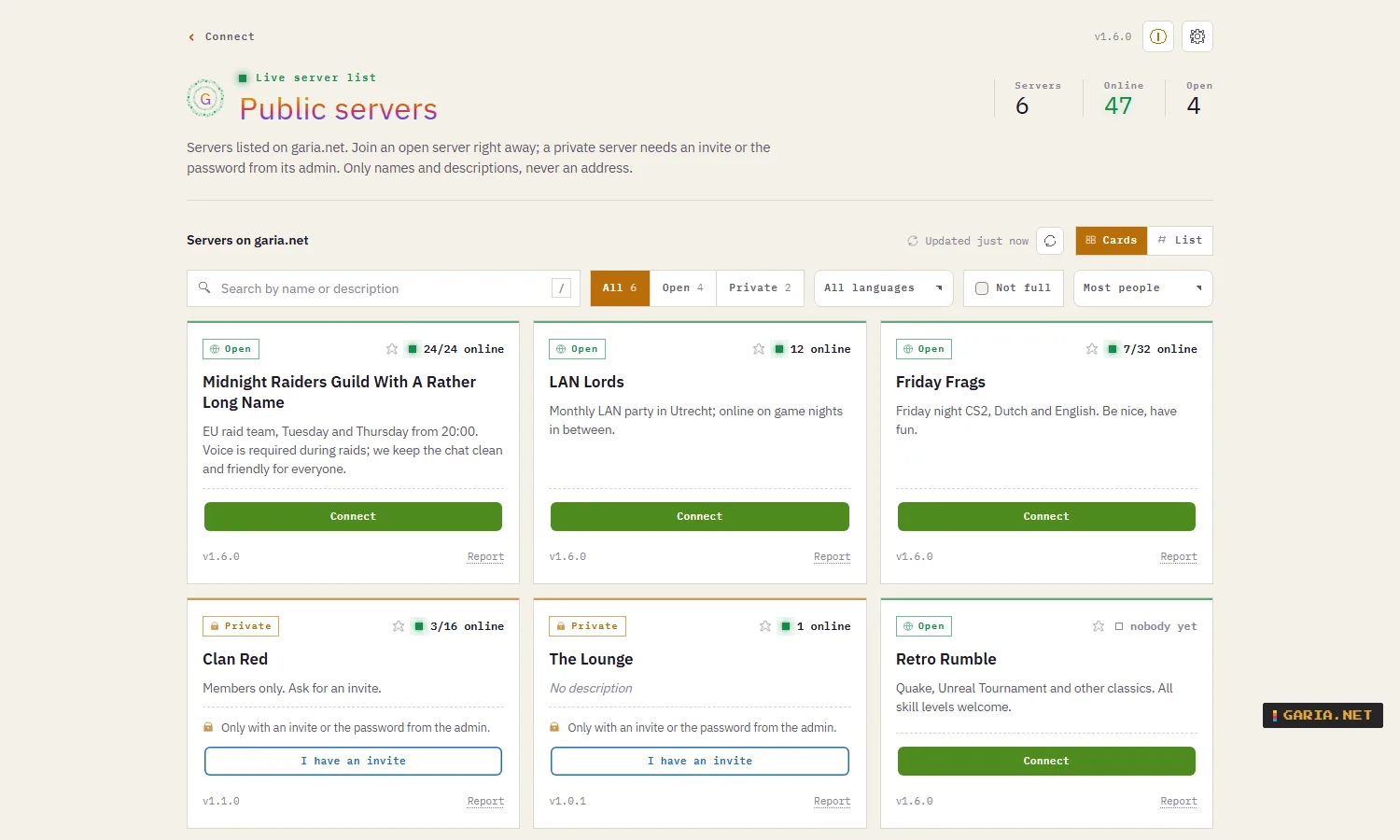
| Server list | Optionally listed on garia.net: open servers anyone can join through a relay, private ones with an invite. Never an address. |
| Automation | Every admin action from the command line, a local JSON API and an MCP server with 33 tools for Claude. |
| Deployment | An MSI with real properties: app, service, Boss Room, firewall rule, PATH and desktop shortcut, each on or off. Updates without a UAC prompt. |
Join with
G-Speak.exe Chrome Edge Safari gspeak-cli
What you get
| Push-to-talk | A key or a mouse button that also works while a game has focus. Or voice activation with a level meter and a threshold, or always on. |
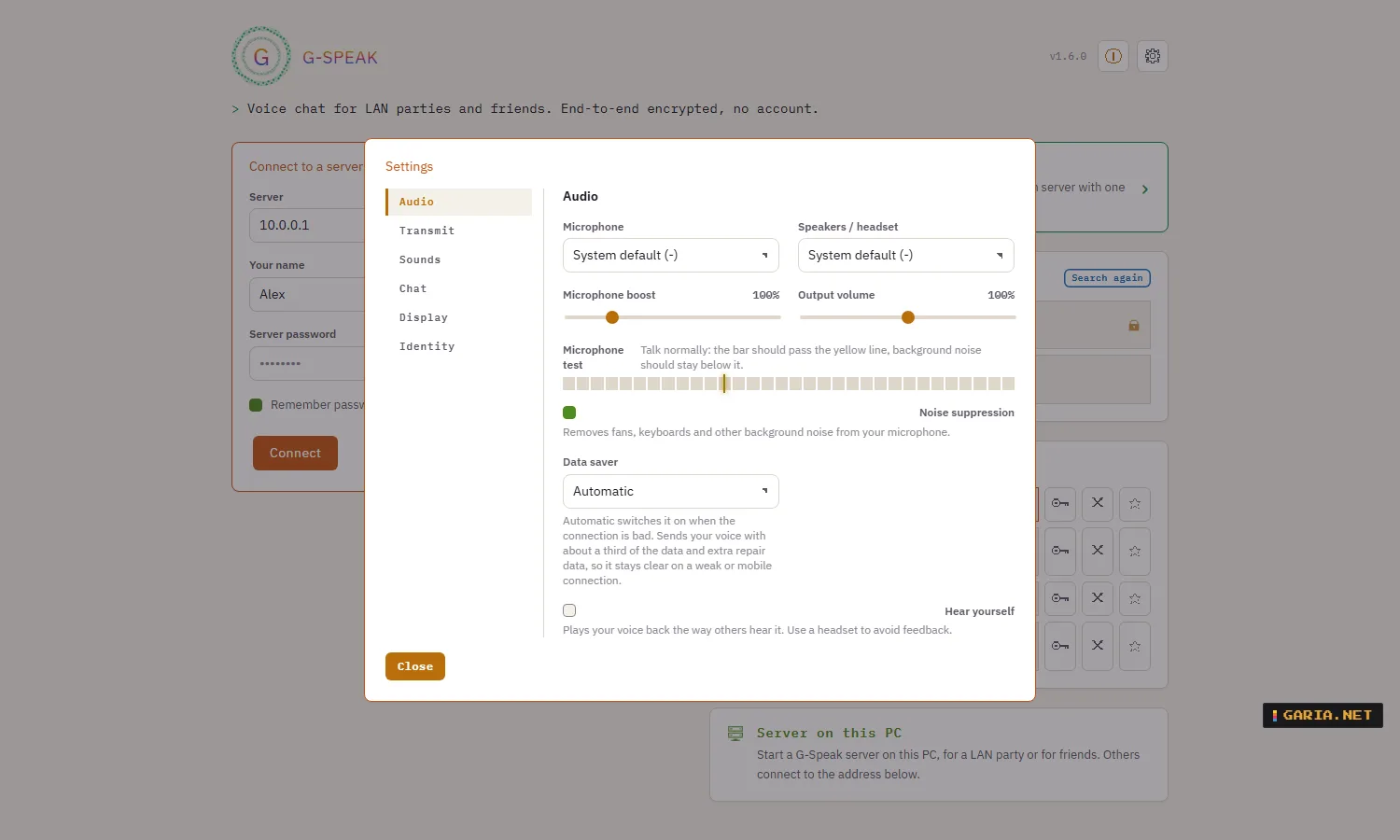
| Sound | Pick microphone and headset, noise suppression, microphone boost, a test that lets you hear yourself, and short arcade sounds you can swap for your own. |
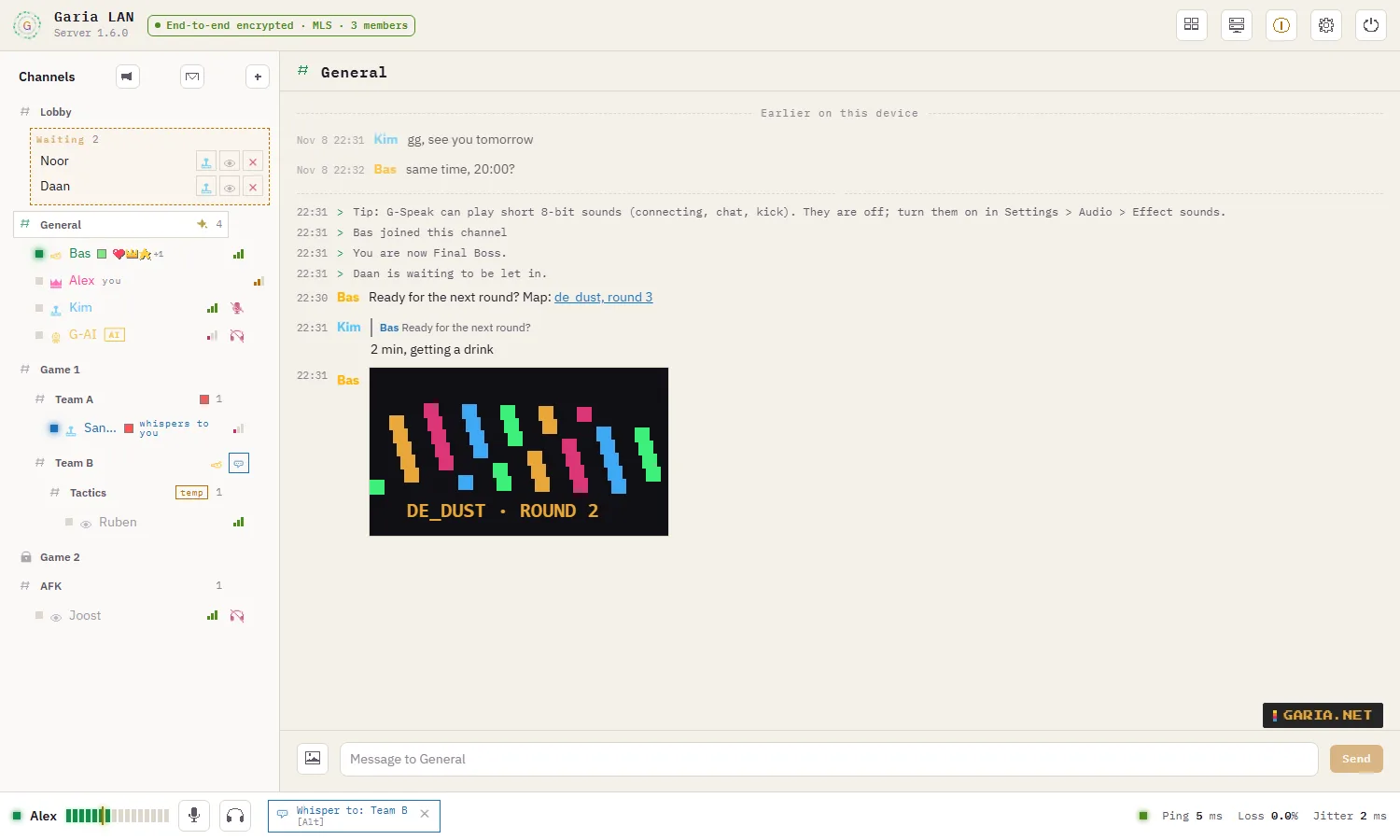
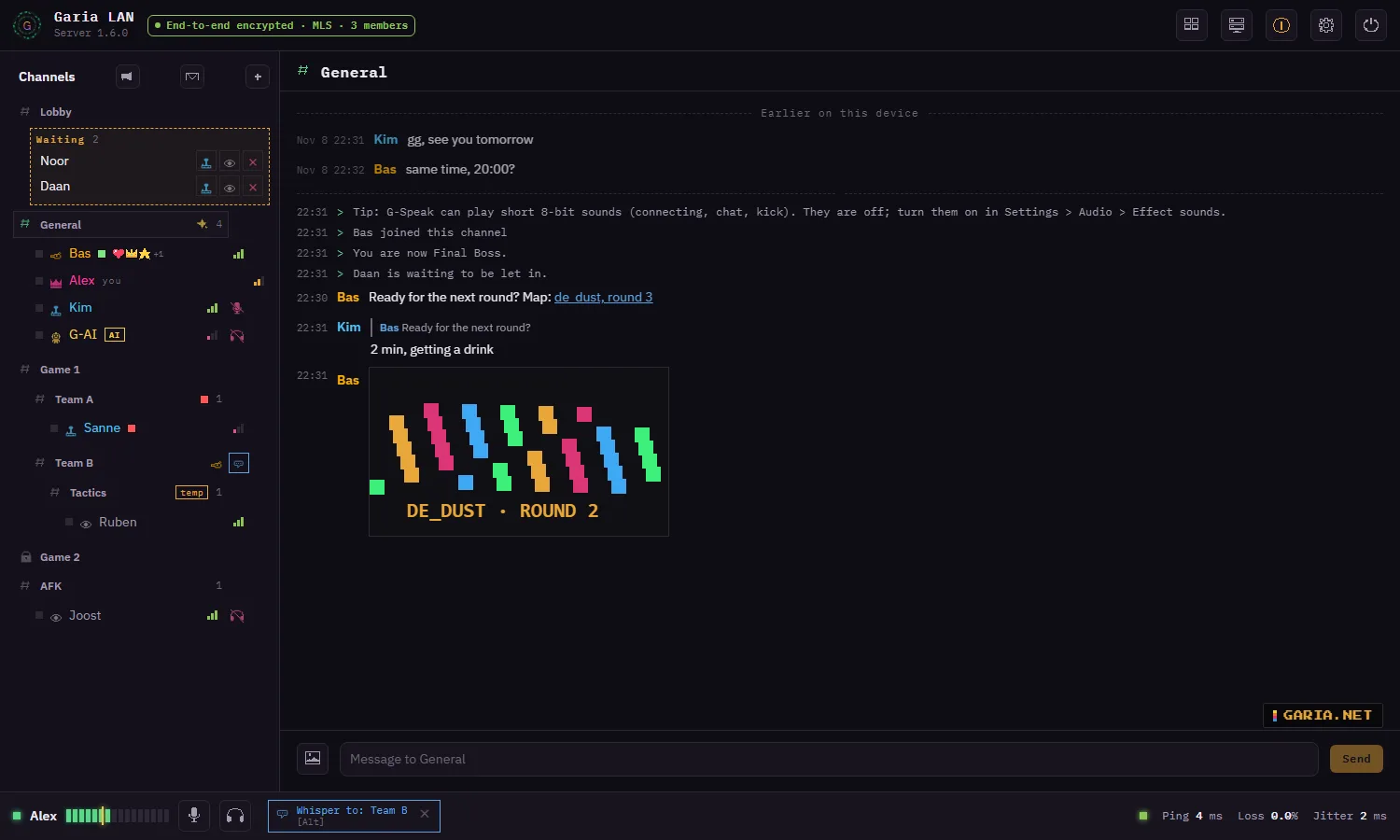
| Channels | Channels and subchannels with who is talking, temporary channels, a password or a minimum role per channel, and channels only for chosen roles. |
| Whisper | A second key: while you hold it only the channels or people you picked hear you, also in other channels. |
| Chat | Per channel and private between two people, with links, replies and images (pick, paste or drop). Kept encrypted on your own device, never on the server. |
| Roles | Spectator, Player, Game Master and Final Boss, plus your own roles such as a clan or VIP, each with a colour and its own rights, including priority speaker. |
| Invites | Links and QR codes with a role, a start channel, an expiry and a number of uses. No password and no waiting for whoever uses one. |
| AI | An optional AI in chosen channels that answers questions, and can let newcomers in, stop spam and handle reports by itself. You choose the service: Claude, ChatGPT, or free on your own PC. |
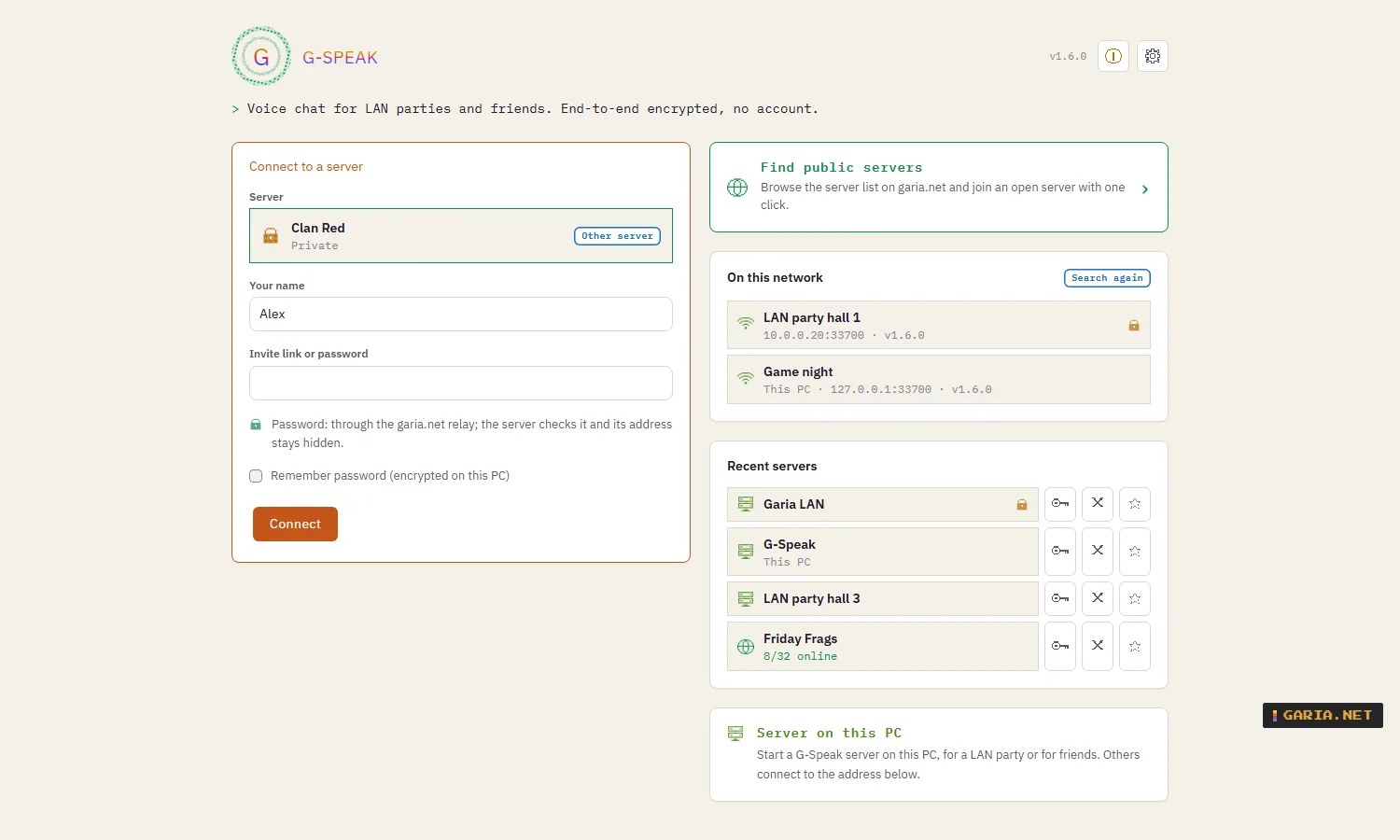
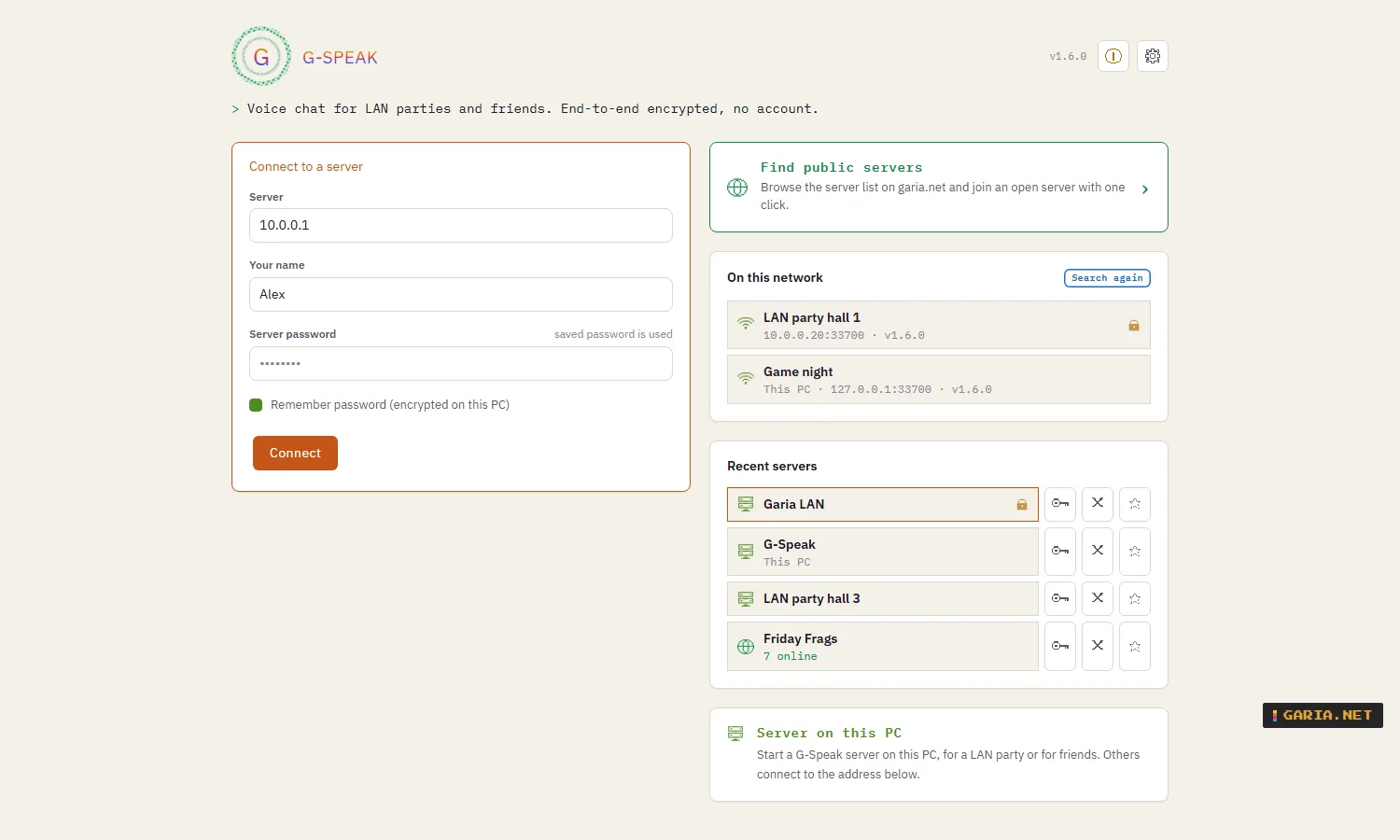
| Servers | Servers on your network show up by themselves. Public servers on garia.net with search and filters, and favourites at the top. |
| Identity | No account. A safety code per person to check nobody is in between, and an encrypted export to take your identity to another PC. |
| Support | Report a problem from the app, the Boss Room or the command line. You see everything that goes along before it is sent. |
Why G-Speak
| Nobody in between | Voice, chat and images are end-to-end encrypted with MLS and SFrame. Not even whoever runs the server can listen in or read along. |
| Ready for tomorrow’s attacks | Connections use TLS 1.3 with the hybrid post-quantum key exchange X25519MLKEM768. |
| Your server, no limits | Free, with no slot limit and no licence key. Your server runs on your own PC, at home or at a LAN party, also without internet. |
| No account | Your identity is a key on your own PC. No e-mail address, no phone number, no profile. |
| Join from a browser | Chrome, Edge or Safari, also on a phone, without installing anything. |
| Address stays private | Open servers in the list are reached through a relay: players never see the server’s address and the server never sees theirs. |
| Moderation that keeps going | An optional AI lets people in, stops spam and handles reports, and every admin action lands in a signed Black Box. |
| Built for admins | Every action from the command line, a local JSON API and MCP for Claude, and an MSI with real properties. |
Compared with other voice chat
| G-Speak | TeamSpeak | Discord | Mumble | |
|---|---|---|---|---|
| Run the server yourself | Yes | Yes | No | Yes |
| Account needed to talk | No | Optional | Yes | No |
| Server can listen in | No, end-to-end encrypted | Yes, encryption ends at the server | Calls: end-to-end since 2024; text: not end-to-end | Yes, encryption ends at the server |
| Free server size | No slot limit | Limited without a paid licence | Not applicable | No slot limit |
| Official browser client | Yes | No | Yes | No |
| Moderation by AI, admin API and MCP | Built in | Not built in | Through bots | Not built in |
Based on the public documentation of the free versions in October 2026; other products change, so check their own pages. TeamSpeak, Discord and Mumble are trademarks of their owners; G-Speak is not affiliated with them.
Using G-Speak means accepting the G-Speak licence. What goes where: privacy statement.
Screenshots
Client
Server (Boss Room)
Examples
1. One PC hosts
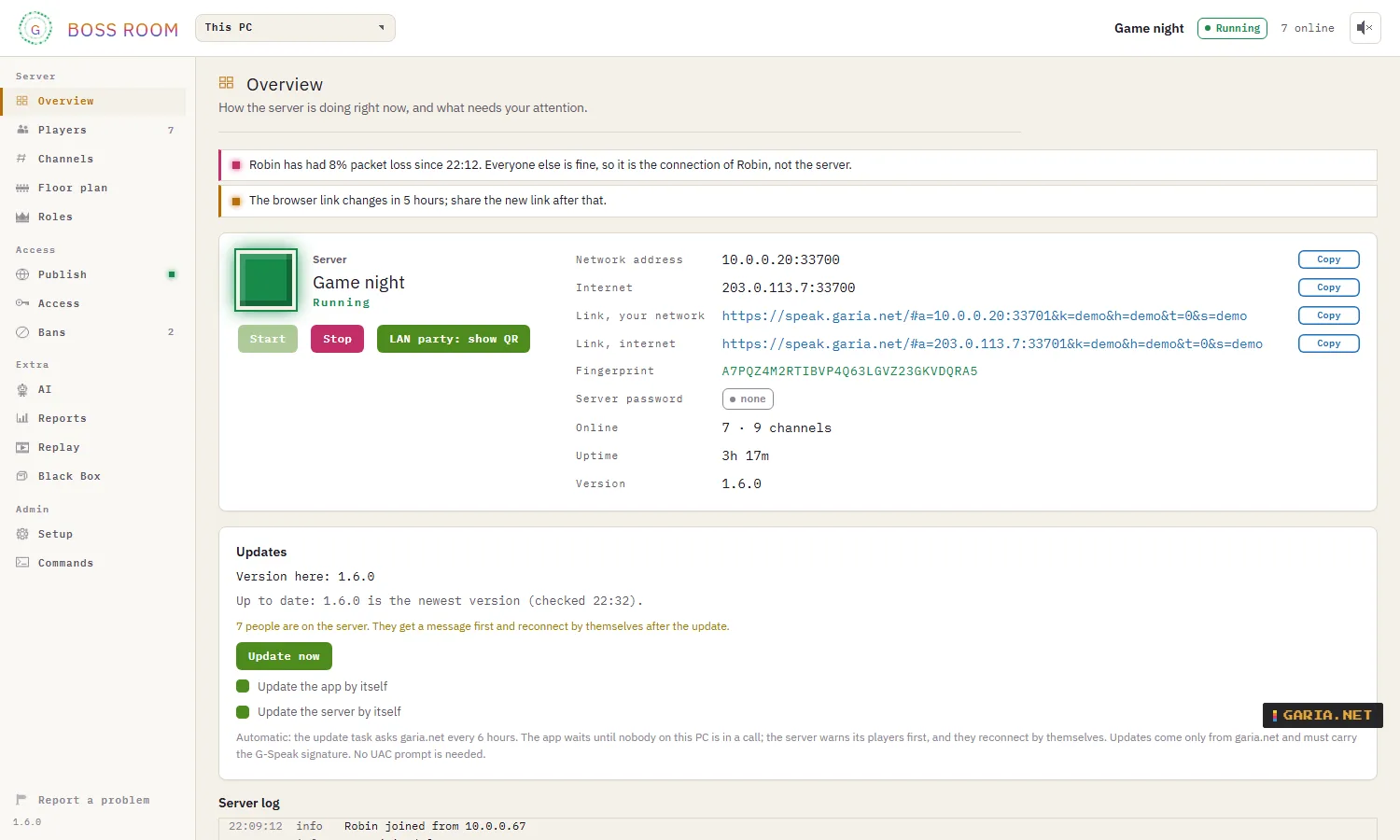
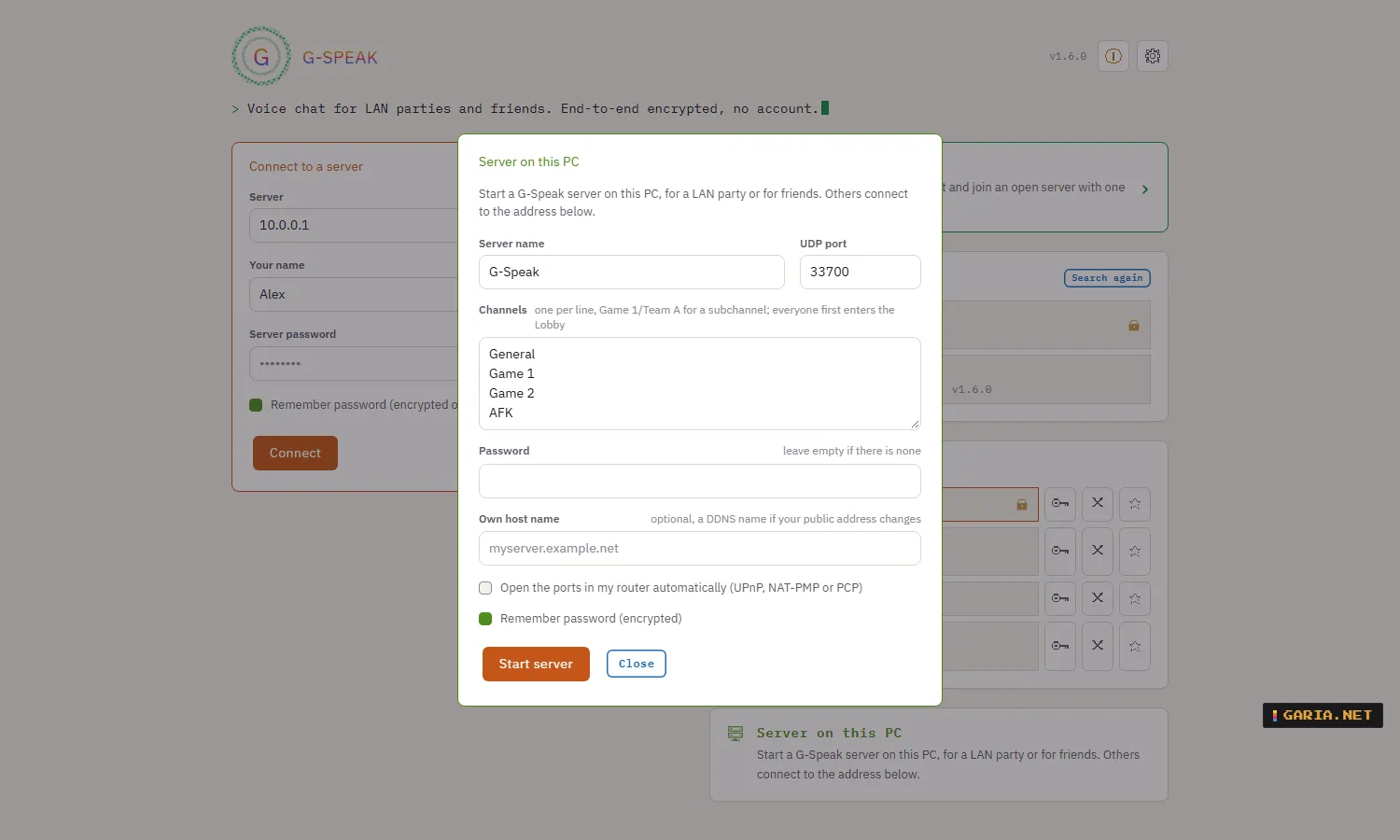
Start G-Speak and choose Server on this PC. Give it a name, channels and a password if you want one, and click Start server. The app shows the address for your network and for the internet, a link for browsers and the server’s fingerprint. For a server that is always on, install the service with the MSI and run it from the Boss Room.
2. Everyone connects
The server appears under On this network; double-click it, or type the address, or open an invite link. The first time, G-Speak shows the server’s fingerprint: compare it with the host and choose to trust it. If a known server’s key ever changes, G-Speak warns you instead of connecting.
3. Talk
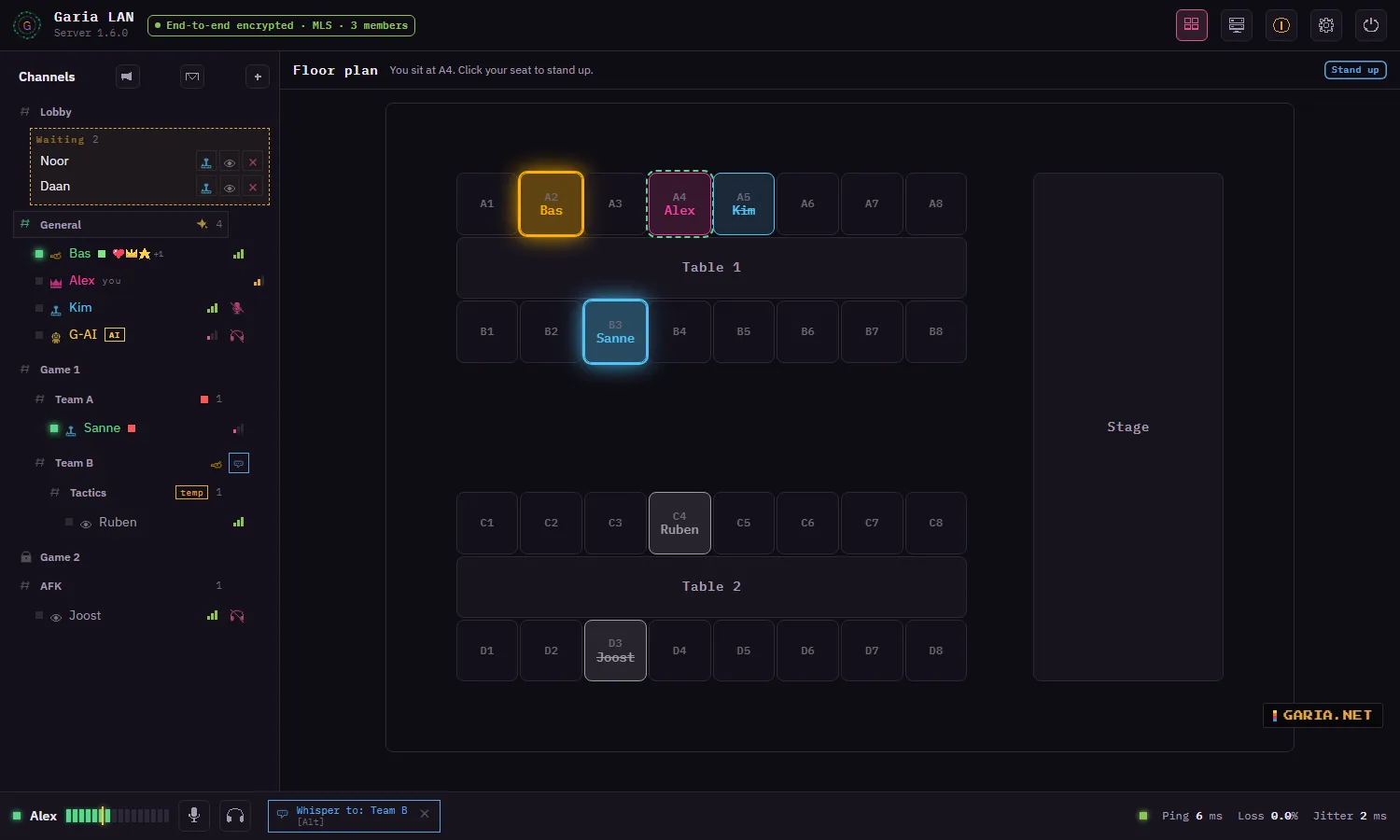
Everyone starts in the lobby and moves on by double-clicking a channel. The top bar reads End-to-end encrypted · MLS · n members once the keys are agreed. If the connection drops, G-Speak reconnects by itself and goes back to the same channel.
A LAN party
Click LAN party: show QR in the Boss Room or in Server on this PC. The QR code fills the screen for a TV or beamer; phones scan it and join in the browser. With Only admitted players on, newcomers wait in the lobby until a Game Master lets them in with a role.
Teams that may not hear each other
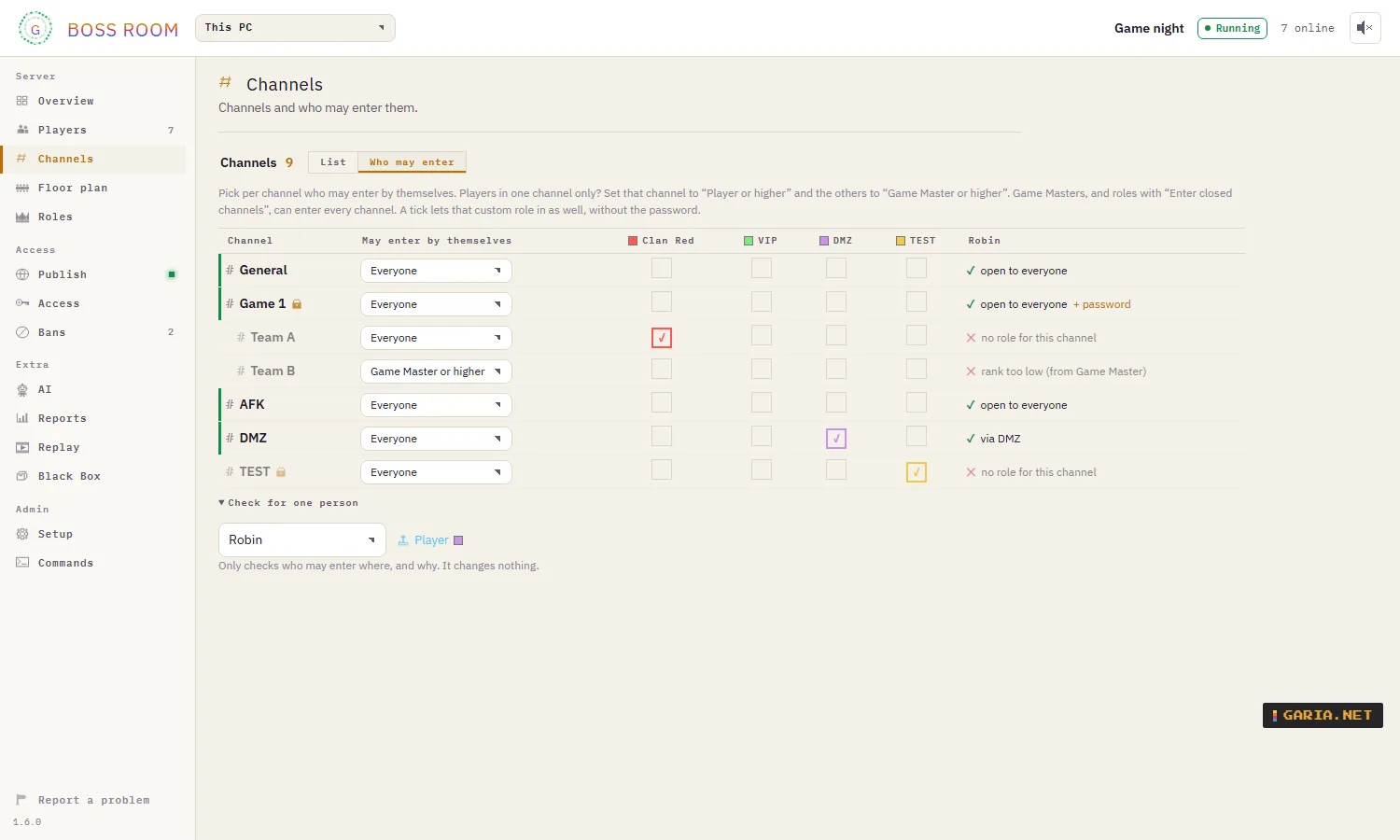
In Boss Room → Channels → Access, make a custom role per team and tick which role may enter which closed channel. Pick a player under Show for to see per channel whether they may enter, and why.
Join an open server from the list
Open speak.garia.net or Find servers in the app, pick a server and click Connect; only your name is left to fill in. Open servers are reached through the relay, so nobody sees the server’s address, and the server never sees yours. Choose once whether you connect with the browser or the G-Speak app; the browser remembers it.
Set up push-to-talk and whisper
The gear at the top right: Transmit → Push-to-talk, then press the key or the side button of your mouse. Set a whisper key too, pick who you whisper to with the whisper button next to a channel or a name, and hold the key: only they hear you.
Install (MSI)
Which MSI
| Download | File | For |
|---|---|---|
| G-Speak | G-Speak-1.5.0-x64.msi | Everything to choose from; by default the app |
| Client only | G-Speak-Client-1.5.0-x64.msi | The app, for players |
| Server only | G-Speak-Server-1.5.0-x64.msi | The server as a Windows service, with the Boss Room; for a PC that hosts |
All three are the same program with a different default choice. Install one over the other and it adds to what is there; updates keep what you have.
Install options
Per-machine, 64-bit, into C:\Program Files\GariaNetTools\G-Speak, with G-Speak under GariaNetTools in the Start menu. Double-clicked it is a wizard with the licence and a choice page; with /qn only the properties count. An update keeps the choices of the previous installation, and never asks for a restart.
The installer is not signed yet, so Windows may warn: choose More info → Run anyway.
msiexec /i G-Speak-1.5.0-x64.msi
msiexec /x G-Speak-1.5.0-x64.msi /qn| Property | Default | Meaning |
|---|---|---|
| INSTALLFOLDER | %ProgramFiles%\GariaNetTools\G-Speak | Install location |
| CLIENT | 1 | The app, G-Speak.exe, also for hosting from the app |
| SERVER | 0 | The Windows service G-Speak Server, which starts with Windows |
| BOSSROOM | 1 | With SERVER: the Boss Room, with a tray icon for whoever installed |
| FIREWALL | 1 | Inbound UDP for the app and the server, private networks only |
| ADDTOPATH | 1 | gspeak-cli and gspeak-server in every new command window |
| DESKTOPSHORTCUT | 0 | Shortcut on the desktop |
A PC that only hosts
msiexec /i G-Speak-1.5.0-x64.msi /qn CLIENT=0 SERVER=1 BOSSROOM=1The service’s settings and keys are only readable by SYSTEM, administrators and the person who installed it.
Updates without a UAC prompt
The installer makes a scheduled task once. Update now (in the app under Credits, or in the Boss Room on the Overview) starts it at once; with automatic updates on it looks by itself. It fetches the new MSI from garia.net and installs it only when it is newer, its SHA-256 matches and it carries the G-Speak release signature. You see each step with a progress bar. People on a running server get an announcement first and reconnect by themselves; the app and the Boss Room close themselves and come back, and the app reconnects to your server.
gspeak-server update
gspeak-server update --now
Ports
| Port | For |
|---|---|
| UDP 33700 | The app (QUIC), and browsers that connect directly (WebRTC) |
| UDP 33701 | Browsers (WebTransport) |
| UDP 33702 | Finding servers on the network; private networks only |
| TCP 33703 | Admin API, on 127.0.0.1 only |
If another device already uses the port, the Boss Room suggests a free one (33710, 33720, …) with a button to switch.
Uninstall
Uninstalling removes the firewall rules, the PATH entry, the service and the update task. Your identity, settings and known servers stay in %LOCALAPPDATA%\GariaNetTools\G-Speak; remove that folder too for a clean slate.
rmdir /s /q "%LOCALAPPDATA%\GariaNetTools\G-Speak"Host a server
From the app or as a service
Server on this PC in the app is the quick way: it runs while the app is open. For a PC that hosts every evening, or one nobody sits at, install the service (SERVER=1) and run it from the Boss Room. gspeak-server key-transfer moves the key of your app server to the service, so the fingerprint stays the same.
A LAN party with teams, from the command line
gspeak-server --name "LAN party" --channel "Lobby" --channel "Game 1/Team A" --channel "Game 1/Team B"A slash makes a subchannel. The server prints the address, the link for browsers and its fingerprint, and keeps its settings in server.json.
| Option | Default | Meaning |
|---|---|---|
| –name | from server.json | Name of the server |
| –channel | from server.json | A channel next to the lobby; repeat it for more, Game 1/Team A for a subchannel |
| –password | none | Server password; or the environment variable GSPEAK_PASSWORD |
| –bind | 0.0.0.0:33700 | Address and UDP port for the app |
| –web | next port | Address and UDP port for browsers |
| –no-web | — | No entrance for browsers |
| –no-lan | — | Do not answer when apps search the network |
| –no-admin | — | No admin API |
| –data-dir | — | Folder for the server key, server.json and admin.key |
Over the internet
On your own network nothing needs setting up. For friends outside your home, UDP 33700 (and 33701 for browsers) has to reach the server. Tick Open the ports in my router automatically (UPnP, NAT-PMP or PCP; closed again when the server stops), or forward them yourself. Check from the internet lets garia.net try to reach your server and tells which port to forward if it fails; nothing is stored. A host name of your own (dynamic DNS) can go in the links instead of your address.
In the server list on garia.net
Boss Room → Publish on Garia.Net, or gspeak-server listing. Garia.Net approves every listing, and the list only shows name, description, language and the number of people, never an address.
| Mode | How people join |
|---|---|
| Private | Joined with the address or an invite from you; needs a server password |
| Open | Anyone joins from the list through the relay (Cloudflare Realtime TURN), so nobody sees the server’s address and no port needs to be open, also behind provider NAT (CGNAT) |
gspeak-server listing open --description "Friday night CS2" --contact admin@example.com --server-lang en --accept-termsListing means accepting the server list terms. A server that is not listed works exactly the same.
Linux and Raspberry Pi
The G-Speak server also runs on Linux: a Raspberry Pi, a VPS or any Linux PC with systemd. It runs as a service around the clock, with its own user, its keys stored encrypted, and the same signed updates as on Windows. There is no Linux app yet: on Linux you talk through the web client in the browser.
| For | Download | Size |
|---|---|---|
| Raspberry Pi 4 or 5, Raspberry Pi OS 64-bit | gspeak-server_1.5.0_arm64.deb | 5.4 MB |
| PC or VPS: Debian 12, Ubuntu 22.04 or newer | gspeak-server_1.5.0_amd64.deb | 6.1 MB |
| Other Linux with systemd (arm64) | gspeak-server-1.5.0-linux-arm64.tar.gz | 8.5 MB |
| Other Linux with systemd (x86-64) | gspeak-server-1.5.0-linux-amd64.tar.gz | 9.3 MB |
Install
Download the package on the machine (or copy it there) and install it. The server starts at once and again after every reboot:
sudo apt install ./gspeak-server_1.5.0_arm64.deb
sudo gspeak-server status
status shows the name, the port and the fingerprint. The package opens no ports in the firewall. With ufw:
sudo ufw allow 33700:33701/udpFor players outside your home, forward UDP 33700 and 33701 on your router to this machine. Running two G-Speak servers in one network, for example one on a PC and one on a Pi? Give one of them other ports and forward those too:
sudo gspeak-server port 33710
sudo systemctl restart gspeak-server
The server then uses UDP 33710, and 33711 for browsers.
Manage it from Windows
The Boss Room on your Windows PC manages a Linux server too, exactly like the one on the PC, including the AI and its API key. First make yourself the Final Boss on it once: connect with the app, then on the server sudo gspeak-server users and sudo gspeak-server role <number> 3. Then pick Add a server at the top of the Boss Room, enter its address and port, and compare the fingerprint with sudo gspeak-server status. It uses the server’s normal encrypted connection: no extra port, and only the Final Boss gets in. The same works from the command line: gspeak-server --remote 192.168.1.20:33700 status.
Set it up with commands
You can also set up a Linux server with commands. Run them with sudo on the machine itself, or over SSH:
| Command | What it does |
|---|---|
sudo gspeak-server rename "My server" | Name of the server |
sudo gspeak-server channels | The channels, each with its number |
sudo gspeak-server channel-add "Games" | Add a channel |
sudo gspeak-server channel-rename 2 "Lobby 2" | Rename a channel: by its number from channels |
sudo gspeak-server channel-delete 2 | Delete a channel: by its number. The Lobby (1) stays |
sudo gspeak-server password | Set or remove the server password |
sudo gspeak-server users | Who is on, each with a session number |
sudo gspeak-server role 3 3 | Make session 3 the Final Boss (0 Spectator, 1 Player, 2 Game Master, 3 Final Boss). Connect with the app first, then look up your number with users |
sudo gspeak-server listing open --description "..." --server-lang en --contact you@example.com --accept-terms | Put the server on the server list as an open server; players join through the relay and never see its address |
sudo gspeak-server listing off | Take it off the list again |
gspeak-server --help | Every command, with gspeak-server <command> --help for its options |
Members of the gspeak group can use these commands without sudo: sudo usermod -aG gspeak $USER, then log in again.
Updates, data and removing
| Updates | Automatic, at most every 6 hours, only a version signed by Garia.Net. Now: sudo gspeak-server update --now. Never restarts the machine |
| Data | /var/lib/gspeak (server key, channels, roles, Black Box), only readable for the service |
| Master key | /etc/gspeak, encrypted with systemd-creds; the key files are stored encrypted with it |
| Log | journalctl -u gspeak-server |
| Remove | sudo apt remove gspeak-server. The server key and data stay, so you can reinstall with the same fingerprint; to delete everything also sudo rm -rf /var/lib/gspeak /etc/gspeak |
Boss Room
Run the server from one window
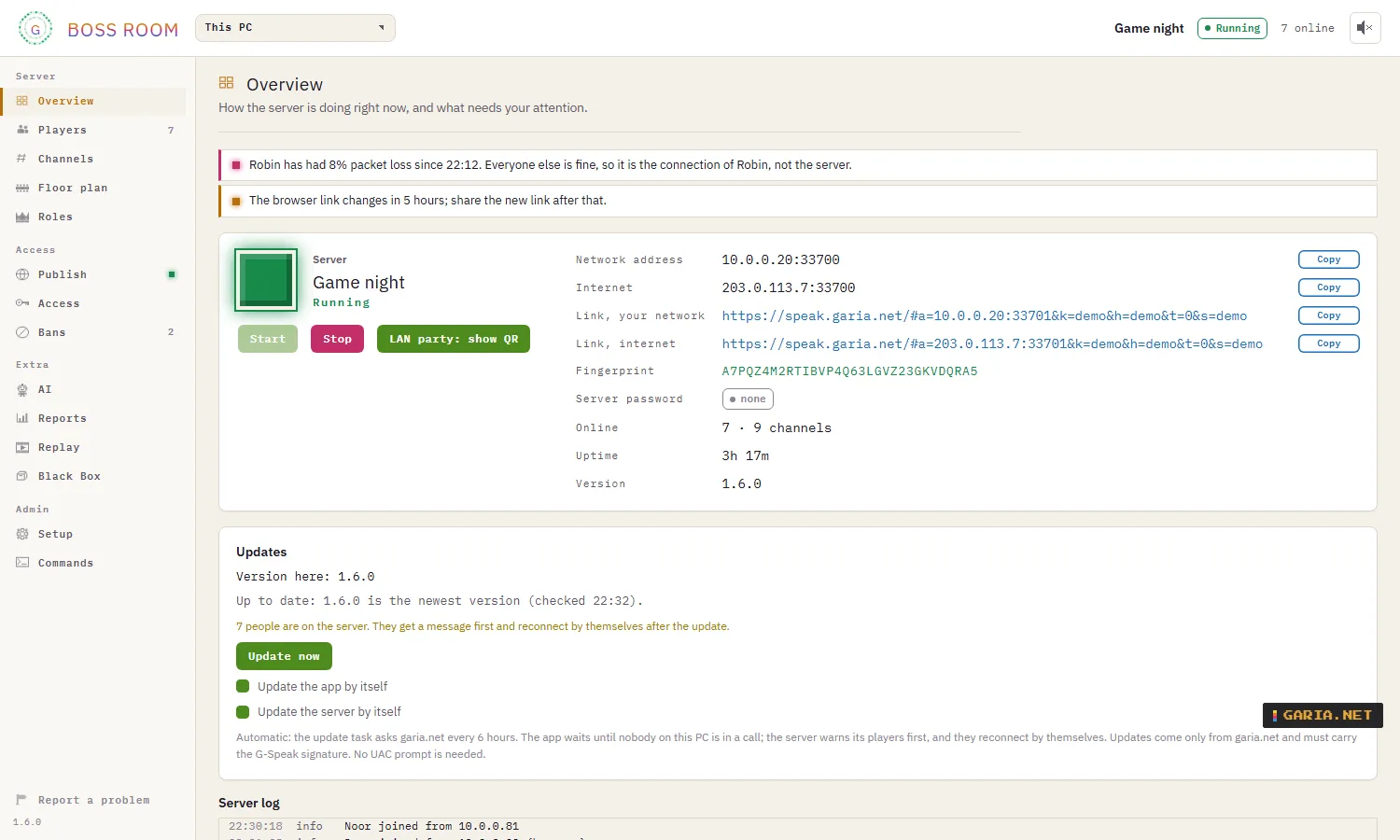
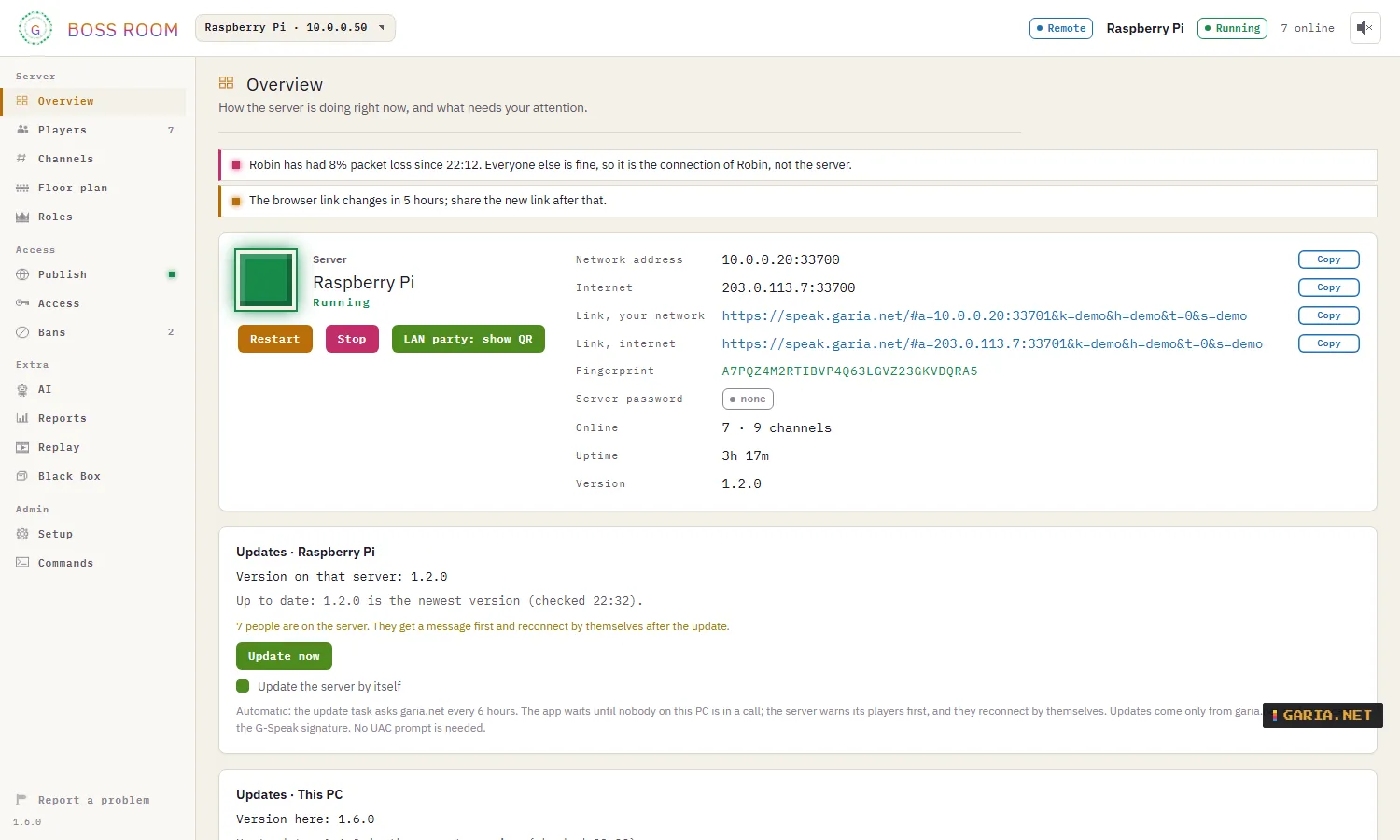
The Boss Room opens from the Start menu or the tray icon and talks to the server on this PC. It draws its own conclusions, such as Robin has had 8% packet loss since 21:03; everyone else is fine, so it is that connection, not the server.
| Page | What |
|---|---|
| Overview | Addresses, browser links, fingerprint, what needs attention and the live log |
| Players | Who is on, ping, loss and jitter; right-click or drag to move, kick, ban or give a role |
| Channels | Add, rename and delete; password, minimum role and chat per channel; the Access grid of closed channels against roles |
| Roles | Rank names and colours, custom roles, and the rights of each in groups |
| Publish | Name, private or open, and the listing on garia.net |
| Access | Server password, only admitted players, newcomer role, maximum number of people, invites, export and import (Excel, CSV, JSON) |
| Bans | By key, and by IP address only if you tick it; for an hour, a day, a week or forever, with a reason |
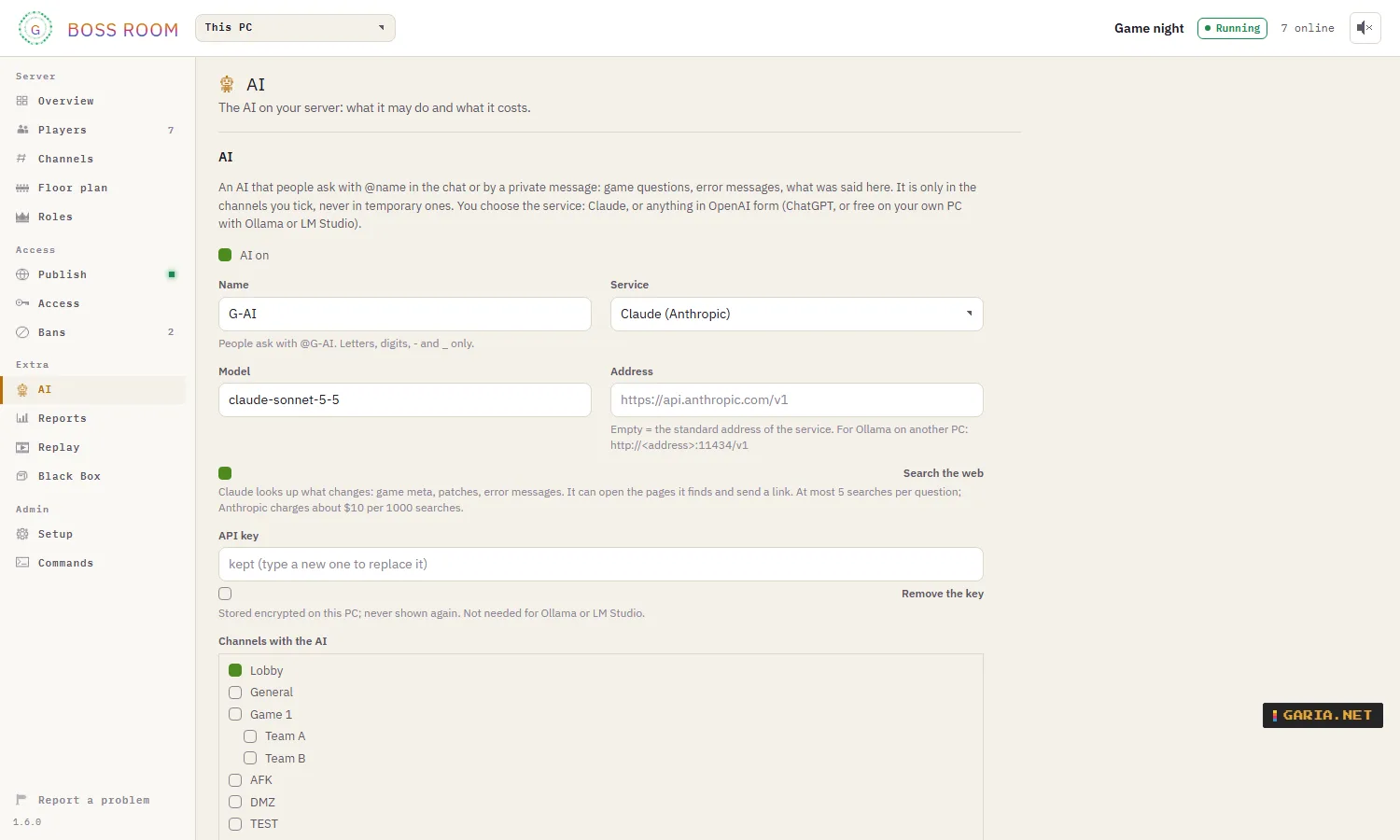
| AI | The AI’s name, service, channels and rights, and what it may do by itself |
| Reports | How an evening went: who was there, the most people at once, kicks, bans, performance and conclusions |
| Replay | A 24-hour timeline of who was there, with ping, loss, bandwidth and CPU; in memory only, without IP addresses |
| Black Box | Every change, each line chained to the one before and signed with the server key, so a changed line shows up |
The AI
People ask it with @G-AI in the chat or privately: game questions, error messages, what was said, a screenshot. With the rights you tick, it can also manage the server for whoever asks. Each of these is off by default and works without paid AI calls where it can:
| Task | What it does |
|---|---|
| Doorman | Lets newcomers in from the lobby; holds back recent kicks, names that look like a link and sudden crowds, and tells the moderators online |
| Spam guard | A warning, then a kick, then a 7-day ban for someone who spams again within 24 hours |
| Reports | Players report someone in its channel; it judges only what that person wrote in the last 15 minutes |
| AFK | Moves people who did nothing for a while to the AFK channel |
| Evening report | A short report to the moderators after each evening or at a set time |
In channels with the AI the chat goes to the AI service you chose; those channels show AI available. Your API key is stored encrypted on the server PC.
Web client
Join from a browser
For a phone, a borrowed laptop or a friend who does not want to install anything: speak.garia.net in Chrome, Edge or Safari. It opens on the public server list; an invite link or the browser link from the host connects straight away. Chat, voice, images, whispering and private messages work as in the app.
Browser or app
Choose once under Connect with: Browser or G-Speak app. With the app, links open G-Speak; if nothing happens, the page offers the download or to play in the browser after all.
Where the data goes
The server’s address and key travel in the part of the link after #, which a browser never sends to the website: garia.net serves the page, voice and chat go straight to the server, end-to-end encrypted. The browser connects with WebTransport, or with WebRTC on the server’s own port, so a link keeps working after the server’s weekly certificate change. Open servers from the list go through the relay.
After the first visit the web client also opens without internet, and on a phone you can add it to the home screen.
Automation
Command line
Every Boss Room action is also a gspeak-server command against the server on this PC. Add --json for the raw answer.
gspeak-server status
gspeak-server users
gspeak-server access --session 4
gspeak-server invite --rank 1 --channel 3 --hours 48 --uses 10 --note "Clan Red"
gspeak-server ban 7 --days 7 --reason "spam"
gspeak-server announce "Final round in 5 minutes"
gspeak-server report --session
gspeak-server export setup.xlsx
gspeak-server blackbox --verify
Admin API
HTTP with JSON on 127.0.0.1:33703 only, for scripts on the server PC. Each request carries Authorization: Bearer <key>; the key is in admin.key in the data folder, so only who can read that file is an admin. One command language with some 50 commands, the same as the Boss Room and the CLI.
POST /v1/command   {"cmd":"user.kick","session":7,"reason":"afk"}
GET  /v1/events    new log lines
MCP for Claude
gspeak-server mcp is an MCP server over stdio with 33 tools: status, updates, people, channels, access, ranks and roles, priority speaker, invites, announcements, kicks and bans, reports, problem reports and the Black Box check.
claude mcp add gspeak -- gspeak-server mcpThen ask, for example: who has had packet loss tonight? or make an invite for Team B for tonight, 5 uses.
Security
Even the server cannot listen in
Whoever runs the server, or listens on the network, cannot hear the voice or read the chat. G-Speak uses proven, published standards and libraries for this, no home-made cryptography.
| Layer | How |
|---|---|
| Connection | TLS 1.3 only, with the hybrid post-quantum key exchange X25519MLKEM768 |
| Channel keys | MLS (RFC 9420): a group per channel, with new keys when someone joins or leaves |
| Voice | SFrame (RFC 9605): every voice frame encrypted end-to-end |
| Chat and images | End-to-end encrypted with the channel keys; whispering and private messages have their own group |
| Identity | An Ed25519 key per user and per server. Fingerprint on first connect, a warning when a known server’s key changes, and a safety code per person |
| On the PC | Identity, server key, saved passwords, chat history and API keys encrypted with Windows DPAPI; server passwords hashed with Argon2id |
What the server does see
Who is online, in which channel, who is talking and when. It keeps no chat. The Replay and the Black Box never contain IP addresses, conversations or passwords.
When players connect directly to a server, its owner can see their IP addresses, as with any game server. On open servers in the list everyone connects through the relay, so the server and the other players never see each other’s address, and garia.net never stores or shows a server’s address.
The AI is a member you can see
G-AI is off by default. If a server owner turns it on, it joins the chosen channels as a member with its own name, and those channels show AI available. Like every member, it can read the chat and see the images in those channels, and send them to the AI service the owner picked (Claude, or another service, also one running locally). It never hears voice. Where it is not, it reads nothing.
What else keeps it safe
The chat carries text, links and images only. Images are redrawn before they are sent, which drops hidden content and metadata such as a GPS location, and the receiver checks them again. Requests from servers to garia.net are signed. Fuzz tests feed malformed data to everything that reads from the network or from files.
Updates
An update only installs when its signature matches the Garia.Net release key that is built into G-Speak, and its checksum matches. Even someone who took over garia.net could not make G-Speak install their own installer. Automatic updates check at most every 6 hours, and only send the version number.
Who is behind it
G-Speak is made by Garia.Net, the maker of the other tools on this site. Found a security problem? Mail privacy@garia.net or use Report a problem in the app. Please give a short time to fix it before you publish it.
No account, no ads, no tracking. Details in the privacy statement, the licence and the server list terms.
Licence and compliance
Closed software, open about what is in it
G-Speak is closed-source software by Garia.Net, free to use under the G-Speak licence. It is not open source and not based on another product: the app, the server, the protocol and the Boss Room are its own code.
Open-source components
G-Speak uses well-known open-source libraries, for example for TLS, MLS, audio and the user interface, only under permissive licences:
MIT Apache-2.0 BSD ISC Zlib
Libraries under GPL, LGPL, AGPL or MPL are never used. Before every release this is checked automatically: cargo-deny for the Rust code and a licence check for the npm packages. The same check compares the Rust libraries with the RustSec advisory database. The full list of components with their licence notices comes with the installation as THIRD-PARTY-NOTICES.txt.
What it follows
| How | |
|---|---|
| GDPR (AVG) | Data kept to a minimum: no IP addresses in garia.net’s G-Speak data, set retention periods, and the rights to access, correct and delete. See the privacy statement. |
| Digital Services Act | Notice and action for the server list: a Report button on every listing, every decision logged with a reason, and a contact point at privacy@garia.net. See the server list terms. |
| MLS, RFC 9420 | Group keys per channel, renewed when someone joins or leaves |
| SFrame, RFC 9605 | Every voice frame encrypted end-to-end |
| TLS 1.3 | Only TLS 1.3, with the hybrid post-quantum key exchange X25519MLKEM768 |
| Testing | Automated tests from client to server, and fuzz tests on everything that reads from the network or from files |
Not done yet
G-Speak has no certification and has not had an independent security test (pentest) yet; one is planned. The installer is not signed with a code-signing certificate yet, so Windows may warn when you run it.
The documents: G-Speak licence · G-Speak privacy · G-Speak server list terms.
Changelog
[1.5.0] – 2026-11-02
Changed
- Boss Room: the LAN party screen with the QR code opens in its own window, so the Boss Room stays usable. Drag it to a second screen or projector; double-click for full screen, Esc to close.
- The look follows the dark or light mode of your device (System) unless you chose one yourself.
- Chat: names have the colour of their role, the same as in the channel list; your own messages have a thin line on the left.
Fixed
- AI: asked whether there is an update, it now asks garia.net right away (new
update_check, also in the admin API and MCP) instead of reading when the update task last looked; the status also says how long ago that was.
[1.4.0] – 2026-11-02
Added
- Choice of look in Settings → Display: Arcade (the original 8-bit look), Dark, Light, or System (follows the dark or light mode of your device). Applies to the app, the web client and the Boss Room.
Changed
- Boss Room: opens on the server on this PC, also after a restart or update. Only without a server on this PC does it return to the remote server chosen last.
- LAN party screen: the server name is shown much larger, so it is clear which server the QR code joins.
Fixed
- AI: an action that needs a "yes" (update, restart, ban and the like) is confirmed once. The AI no longer asks first itself, and a "yes" to its question counts; "yes please" or "ja, doe maar" count too.
- Settings on a phone: the Close button no longer covers the text at the bottom of a long page.
[1.3.0] – 2026-11-01
Added
- Data saver for weak or mobile connections: when the connection meter sees loss or long delays, your voice goes out with about a third of the data and extra repair data, so it stays clear instead of breaking up. It switches back after half a minute of good measurements. Settings → Audio: automatic (default), always on or off; "SAVER" appears next to the meter while it is on. Works in the app and the web client.
- Restart the server on Windows: from the Boss Room, through the AI (only for whoever administers the server, after a "yes") and with remote management. The Windows service now restarts by itself after a restart request; a normal stop stays a stop.
- Medals: admins with the new "medals" right hand out badges of honour (title, 8-bit icon, event), shown next to the name and on a profile card for everyone on the server. Also in the Boss Room, export/import, the command line, MCP and the AI.
Security
- Web client: the MLS crypto library moves to a version without the timing issue in crypto-bigint (RUSTSEC-2026-0387). G-Speak’s own cipher suite was not affected.
Fixed
- Updates: "update now" is no longer lost when the scheduled check runs at the same moment and finds someone in a call.
Download
Release 1.5.0
2 Nov 2026 · Windows x64 · server also on Linux and Raspberry Pi · browser: Chrome, Edge or Safari · EN NL FR ES PT
SHA-256 .msi 04b20ca816d0a53149291b4fe757f98b1aa26e53fc14ed985f6faed338f5719c
Words about G-Speak
Be civilNo linksOne line, 140 charactersChecked before it appears
No words yet.